How to build a fast browser agent with Jev and OpenAI's Decisions API
Decision models like TypeSafe's Jev and OpenAI's new Decisions API pick a browser agent's next click in about 150 ms. We read the two open source agents built on Jev and wrote down the loop, the code, the numbers and where it breaks.

Part of How to record a product demo video that people finish
What is a System One decision model?
A System One decision model is an AI model that answers a bounded question with probabilities and does not write text. You send it the state of a program and a typed question, such as "which of these 40 elements should be clicked next", and it returns the chosen option, a probability for every option and a confidence score, in a few hundred milliseconds.
The name comes from Daniel Kahneman's fast, intuitive System 1. TypeSafe AI coined the category with Jev on 15 September 2026, and OpenAI answered with its Decisions API on 29 September. For a browser agent, it is the part that picks the next click.
Browser agents are slow because every step is a full language model call. The model reads the page, reasons about it, writes out a JSON action, and the harness parses it. That takes seconds, and most of those steps are not hard. Type the email. Type the password. Click Sign in. That is reflex, and a model that only has to point at one of 40 numbered elements can do it in about 150 ms.
This post covers the three kinds of decision model you can call today, the loop that turns one into a browser agent, the numbers from the two open source agents that already run on Jev, and where it breaks.
The decision models you can use today
| Model | From | Input | Latency | Price | Status |
|---|---|---|---|---|---|
Jev (jev-1.13.0) | TypeSafe AI | Text and JSON | 70–500 ms | $0.042 per million input tokens, output free | Open to everyone since 27 September |
| Decisions API | OpenAI | Text and images | About 150 ms | Not published | Limited preview since 29 September |
| WebJev, Laya, OneJev, Vev | Open weights | Text; OneJev and Vev take images | Your hardware | Your hardware | Downloadable now |
Figures from each vendor's announcement and the projects' own repositories, checked on 2 October 2026.
Jev, from TypeSafe AI
Jev is the first System One model and still the one with the most built on it. TypeSafe released it in limited early access on 15 September 2026, alongside a $40 million seed round led by DCVC, and dropped the waitlist on 27 September, so anyone can make a key now. It runs as a hosted, closed weights API, and there is no local version.
It answers three shapes of question, and one request can carry several:
- Choice picks one option from a set you name, and returns a probability for every option plus a confidence score.
- Score places the input on an ordered rubric, such as calm, concerned, angry.
- Noul is a yes or no, returned as a probability from 0 to 1.
There are official SDKs for Python (typesafe-sdk) and JavaScript
(@typesafe-ai/sdk), and the same model is reachable through Cloudflare
Workers AI, Vercel AI Gateway, Netlify AI Gateway and OpenRouter, each with
its own request shape. The direct endpoint is POST /v1/systemone.
OpenAI's Decisions API, on GPT-6 Luna
OpenAI announced the Decisions API at DevDay on 29 September 2026, two weeks after Jev. It runs on a specialised version of GPT-6 Luna, the cheapest model in the GPT-6 family, which OpenAI released on 22 September. You define questions and the answers each one may take, supply context as text or images, and get back a choice with a confidence score in about 150 ms. A standard call to Luna takes about 1.6 seconds.
OpenAI's own announcement names choosing an agent's next action as one of three uses, next to classifying content and routing requests.
It is in limited preview for selected customers, with a broad release promised "in the coming days". As of 3 October its documentation page still returns a 404, and OpenAI's pricing page has no row for it. Luna itself lists at $0.10 per million input tokens, and OpenAI has not said whether decisions bill at that rate. Build against Jev today, and keep the decision call behind one function so you can swap it when the schema ships.
The image input matters for browser agents. Jev reads a text description of the page, so a canvas app, a chart or a map with no accessible labels is invisible to it. A decision model that reads a screenshot can choose there.
Open weights alternatives
Several open models copy Jev's request shape, so a client written for
/v1/systemone talks to them unchanged.
- WebJev is trained for browser agents specifically, as a fine-tune of Qwen3.5-35B-A3B under Apache 2.0. Its authors report 47 of 122 gradable live-web tasks completed against 20 of 120 for Jev 1.13 inside the same agent, with the caveat that the runs were on different days. It needs one 80 GB GPU.
- Laya runs Choice, Score and Noul locally, including in a browser through ONNX, so no page data leaves the machine. The base checkpoint needs fine-tuning on your task to be useful.
- OneJev and Vev take screenshots in the state. Vev's weights carry a non-commercial licence.
How a decision model drives a browser
Both open source Jev agents, Browser Use's Jev Ultrafast and hunch, run the same five step loop. The model makes one choice per step. Code does everything else.
1. Turn the page into a numbered table
Read the page once per step and list every control a person could use, with its role, its label and its current value. Give each one a number.
[1] button    Change ticket type · Round trip
[2] combobox  Where from?        · San Francisco
[3] combobox  Where to?          · empty
[4] textbox   Departure          · empty
This is all the model sees, and it is what keeps the agent fast. Jev
Ultrafast sends no screenshot in its default loop and only the text that is
visible on screen, so an article body or a footer below the fold does not
fill the request. Hunch reduces field contents to filled or empty and
drops the URL's query string, so a typed password never leaves the machine.
2. Ask for the operation and the target in one request
The next step has two parts: what to do (click, type, select, scroll, wait, done) and what to do it to. Asking them one after the other costs two round trips. Ask them together.
One request carries an operation question and a target question for every
operation on offer: click_target lists only the clickable elements,
type_text_target only the editable ones. The model answers all of them,
and code uses the target that matches the chosen operation and throws the
others away. TypeSafe calls this speculative fan-out. Two decisions, one
network round trip.
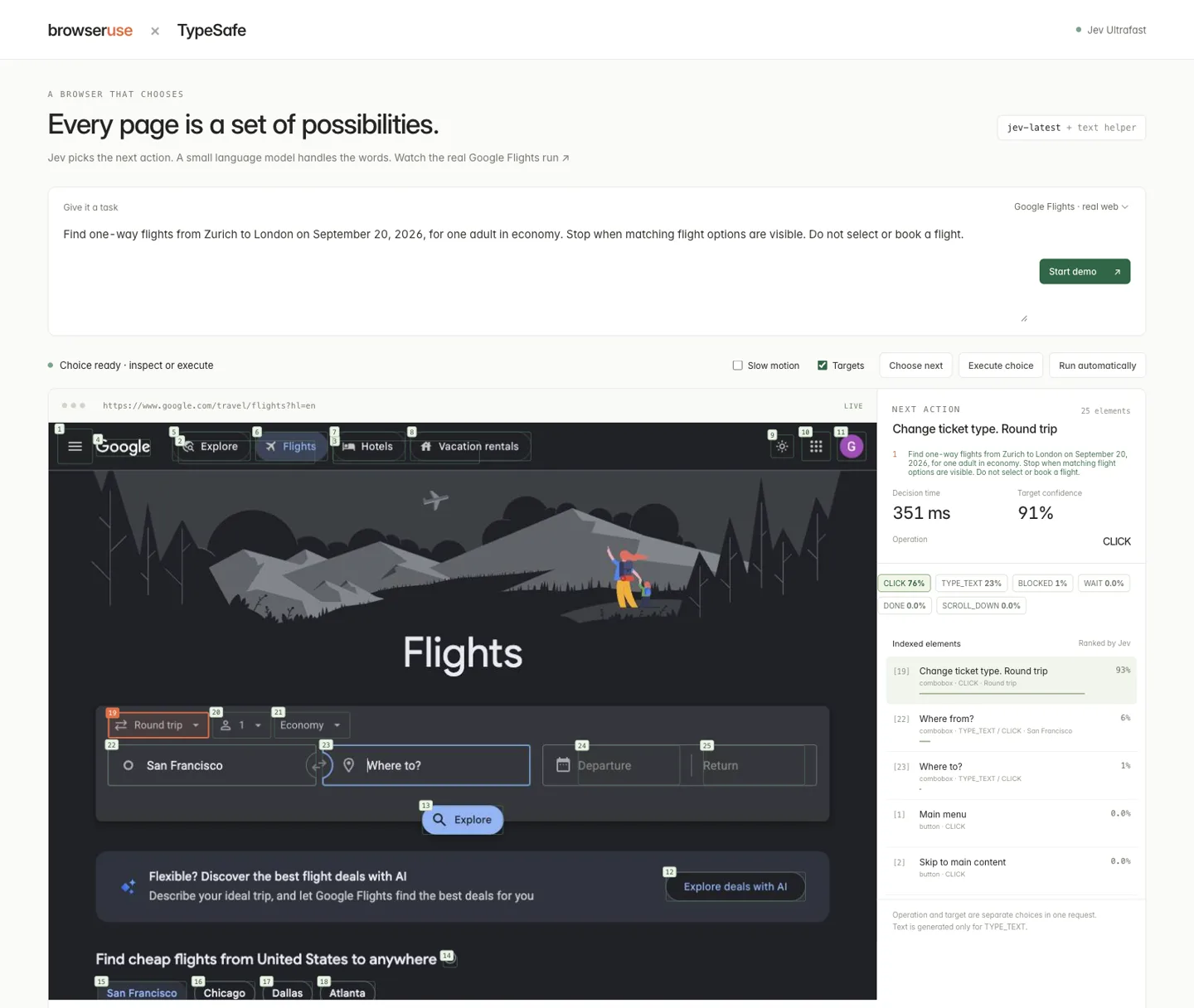
Jev Ultrafast's inspector, from its repository (MIT). The operation head and the target head come back from the same request: 76% click, and of the clickable elements, 93% on the ticket type.
3. Let code check the answer before anything happens
The answer is a probability distribution, and code decides what to do with it.
- Validate the shape. The chosen option is one you offered, the probabilities cover every option and sum to 1. Jev Ultrafast refuses to act on anything else.
- Gate on confidence. Hunch acts only above 0.75 by default. Below that, it stops and escalates.
- Ask a second question about risk. Hunch adds a Noul to the same request: would this click delete, send or spend something? A high probability, or a word like "pay" or "publish" on the button, stops the click.
- Recheck the page. Before a click, confirm the target is still there, still visible, not covered by an overlay, and that the form around it has not changed since the snapshot.
The model's output never becomes a CSS selector, a coordinate, a script or a shell command. It can only point at a number you listed.
4. Hand text and hard steps to a language model
A decision model cannot write. When the chosen operation is TYPE_TEXT, Jev
Ultrafast sends the goal and the selected field to a small, fast language
model, which returns exactly one string. In the Google Flights run below it
wrote "Zurich" in 581 ms and "London" in 346 ms.
Hunch goes further and has no language model of its own. You pass the values it may type by name, and when confidence drops, the page stops changing or a click looks irreversible, it exits with a report for the agent above it: the reason, the visible text, the steps so far. That is the moment to spend a language model call, and usually the only one.
5. Verify the outcome in code
A DONE answer from the model is a claim. Check it: a URL that matches, a
confirmation message on the page, the flight route and date in the results.
Both agents treat a model's DONE with no independent check as a failure.
One decision step in Python
This is the core of Jev Ultrafast's loop, cut down to one operation question and one target question per operation, written with TypeSafe's official Python SDK.
from typesafe_sdk import Choice, TypeSafeClient

def next_step(client, goal, page, elements):
    clickable = {e["index"]: e["label"] for e in elements if "CLICK" in e["operations"]}
    editable = {e["index"]: e["label"] for e in elements if "TYPE_TEXT" in e["operations"]}

    result = client.system_one(
        state={"goal": goal, "page": page, "elements": elements},
        questions={
            "operation": Choice(
                instructions="Advance the goal from the current page with one operation.",
                criteria={
                    "CLICK": "Click a button, link, option or date.",
                    "TYPE_TEXT": "Enter text in an editable field.",
                    "DONE": "Every requirement is visibly satisfied.",
                    "BLOCKED": "No supported operation can progress.",
                },
            ),
            # Speculative: both targets are chosen now, only one is used.
            "click_target": Choice(
                instructions="If the next operation is CLICK, which element?",
                criteria=clickable,
            ),
            "type_text_target": Choice(
                instructions="If the next operation is TYPE_TEXT, which field?",
                criteria=editable,
            ),
        },
    )

    op = result.choices["operation"]
    if op.probabilities[op.choice] < 0.75:
        return {"escalate": "low_confidence"}
    if op.choice in ("DONE", "BLOCKED"):
        return {"operation": op.choice}
    target = result.choices[op.choice.lower() + "_target"]
    return {"operation": op.choice, "target": target.choice}

with TypeSafeClient() as client:  # reads TYPESAFE_API_KEY
    step = next_step(client, goal, page, elements)
Three things this leaves to you, all of which the full agents do: validate
the response before trusting it, recheck the target against the live page
before acting, and verify DONE independently.
What the numbers say
Jev Ultrafast searched Google Flights from Zürich to London, one way, in 7.073 seconds at 1x, from one plain English goal. That run made 17 Jev requests with a median of 178 ms each, two text calls for the city names, and ten browser actions. Across three matched pairs, its new loop cut the median task time from 9.45 to 7.09 seconds and browser protocol calls from 1,092 to 101. The same agent opened a named Wikipedia article in 2.8 seconds.
Gregor Zunic's demo of the Flights run on X
Hunch measured Jev against gpt-4o-mini in JSON mode on the same four
page states, 24 calls each. Jev's median was 153 ms against 678 ms,
and both got all 24 right. A whole form, three fields and a submit, took 3.4
seconds end to end, with 675 ms of it spent deciding, at about $0.0002 in
model cost.
Read these as their authors do. They are a handful of tasks on one machine, not a benchmark. The snapshot and the browser action cost the same whatever model decides, about 330 ms and 170 ms a step in hunch's measurements, so the end to end gain is smaller than the per-decision gap.
Where decision models break
Plan for these before you point an agent at a real site.
- Literal reading. TypeSafe's own notes for Jev 1.13 say it takes instructions too literally, cannot count reliably, struggles with date comparison and multi-step reasoning, and loses accuracy when the state is full of irrelevant text. Write goals as plain, direct instructions and keep the state to what is on screen.
- Probabilities are not certainties. The same input can move a probability by about 0.05 between calls, so leave margin in a threshold. Independent studies found Jev's Choice probabilities well calibrated overall, and also that calibration depends on your data. Label a few hundred of your own steps and set the threshold from those.
- No reasons. Jev returns a number and no explanation. Log the full request and the full distribution for every step, or a wrong click is impossible to debug.
- Hostile pages. The page text is model input, and a page can try to steer the choice. A fixed list of options, an origin allow-list and a separate risk question limit what it can do. They do not make an untrusted page safe.
- The hard parts of the web. Both agents list shadow DOM, iframes, canvas, file uploads, pop-up tabs and drag and drop as unsupported. Those are the cases for a full computer-use model, or for a decision model that reads images.
Recording what your agent does
A browser agent is judged on its demo, and the demo is a screen recording: the Flights run above is a 1x screencast with no opening hold. If you are building one, record the run the way you would record a product launch.
Record the browser window in Prequel at up to 4K and 120 fps, so a 150 ms decision is several frames and not one. The agent clicks through the browser's debugging protocol, so the Mac's own pointer does not move. Place the zooms yourself with Add Zoom on the steps that matter, put a title over each one with its latency, and slow a clip to 0.25x with Speed where a decision is too quick to see. Export has no watermark on any plan.
How to record a product demo video that people finish →
Prequel is $29 once or $9 a month, with a seven-day trial that includes export. It needs an Apple Silicon Mac on macOS 14 or later.
Where to go next
The two agents above are short enough to read in an afternoon. Start with Jev Ultrafast's agent loop if you want a standalone agent, and hunch if you already have a language model agent and want a fast path underneath it.
For the recording side:
- The complete guide to screen recording on a Mac
- Screen recorders that zoom on the mouse
- How to add subtitles to a screen recording
- Screen recording for YouTube
In the changelog
Frequently asked questions
- What is Jev by TypeSafe AI?
- Jev is a System One decision model from TypeSafe AI, released on 15 September 2026 and open to everyone since 27 September. It does not generate text. You send it state and typed questions (Choice, Score or Noul, a yes or no) and it returns the chosen answer with a probability for every option, in 70 to 500 ms. It is priced at $0.042 per million input tokens with output free.
- What is OpenAI's Decisions API?
- The Decisions API is OpenAI's decision model, announced at DevDay on 29 September 2026 and built on a specialised version of GPT-6 Luna. You define questions with a fixed set of answers and supply text or images, and it returns a choice with a confidence score in about 150 ms. As of 3 October 2026 it is in limited preview, with no published documentation or price.
- How do you use a decision model in a browser agent?
- Turn the page into a numbered list of controls, then ask the decision model in one request which operation to perform and which element to perform it on. Code checks the answer, gates it on confidence and risk, and executes it. A language model writes any text and handles low-confidence steps, and code verifies the outcome. Browser Use's Jev Ultrafast and hunch both work this way.
- Is Jev faster than an LLM for browser automation?
- Per decision, yes. Hunch measured a median of 153 ms for Jev against 678 ms for gpt-4o-mini in JSON mode on the same page states, with both correct on all 24 calls. Browser Use's Jev Ultrafast completed a Google Flights search in 7.1 seconds. The page snapshot and the browser action cost the same with any model, so the end-to-end gain is smaller than the per-decision gap.
- Can Jev read screenshots?
- No. Jev reads text and JSON, so a browser agent sends it a text description of the page's controls. OpenAI's Decisions API accepts images, and open-weight Jev-style models such as OneJev and Vev take screenshots in the state, which helps with canvas apps and pages without accessible labels.
- Is there an open source alternative to Jev?
- Several open-weight models answer the same Choice, Score and Noul questions through a Jev-compatible endpoint. WebJev is trained for browser agents and needs one 80 GB GPU. Laya runs locally, including in a browser. OneJev and Vev accept images. Each needs testing on your own task before you rely on its probabilities.