Need more than CleanShot X for video?
CleanShot X is a screenshot tool that also records. Prequel is a recorder that hands back an edited video — the two overlap less than the feature lists suggest.
Apple Silicon · macOS 14+ · one email when the first build is ready
CleanShot X
Capture your Mac's screen like a pro.
- Price
- $29 once, or $8 per user/mo
- Free
- No free tier
- Platforms
- macOS
Prequel
Create cinematic screen recordings from Mac
- Price
- Free, or $39 once
- Free
- Free tier, no watermark
- Platforms
- macOS 14+, Apple Silicon
Checked on 21 August 2026 against CleanShot X pricing.
What is CleanShot X, and what is it good at?
CleanShot X is the best screenshot tool on the Mac, and it is not especially close. Scrolling capture, annotation, background and shadow on a screenshot, OCR, pinned overlays, a clean quick-access overlay, cloud links with a custom domain, and a genuinely one-off price at $29 with an optional $19 a year if you want to keep updating.
It also records video — screen, region or window, with system audio, out to MP4 or GIF, with a trim.
If you bought it, you almost certainly bought it for the screenshots, and this page is not an argument against keeping it.
Where its video stops
Deliberately early. CleanShot X's recording is built for the same job as its screenshots: capture something, mark it up, get a link into a thread quickly.
So there is no automatic zoom, no cursor smoothing or resizing, no camera composited into the frame, no background behind the recording, and no timeline beyond trimming the ends. The polish CleanShot X is famous for is applied to still images — a recording comes out as what was on the screen.
That is a reasonable place to stop for a tool that is mostly a screenshot app. It only becomes a problem when the video has to go somewhere public.
Is Prequel a good CleanShot X alternative?
For video specifically, yes — and the two overlap far less than the feature lists suggest.
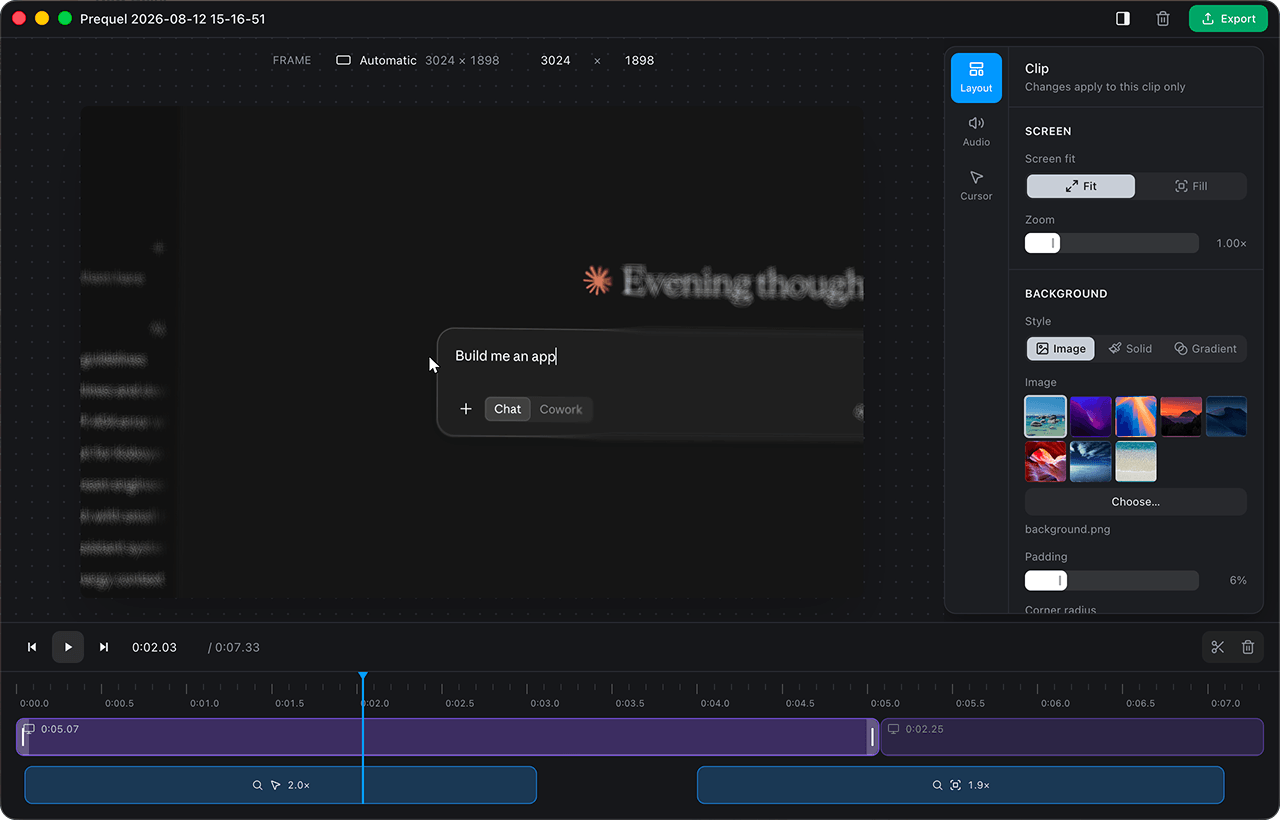
Prequel records the screen, the webcam, the microphone and system audio as separate tracks, watches where you click and type, and opens an editor with zooms already placed on those moments, the cursor cleaned up, the camera framed and a background applied. Cuts happen on a real timeline with a waveform under every clip. Export is hardware H.264 or HEVC at up to 4K and 120 frames per second.
It also shares CleanShot X's pricing instinct, which is probably why you are here: bought once, a year of updates, and the version you have keeps working afterwards. There is a free tier on top of that, which CleanShot X does not have.
Should you replace it, or run both?
Run both, most likely.
Prequel does not take screenshots at all — no annotation, no scrolling capture, no OCR, no pinning. Nothing here replaces the thing CleanShot X is actually loved for, and a Mac with both installed is a completely sensible setup: one for stills and quick clips, one for a recording that has to look produced.
The only reason to choose between them is if your video work is the reason you were considering CleanShot X in the first place. In that case it is the lighter half of a tool built for something else.
How do the features compare?
| Feature | Prequel | CleanShot X |
|---|---|---|
| Automatic zoom on clicks | Included | Not included |
| Zoom on what you type | Included | Not included |
| Cursor smoothing and resizing | Included | Not included |
| Camera overlay, shaped and placed after | Included | Not included |
| Backgrounds, padding and shadow | Included | For screenshots |
| Timeline editing | Included | Trim only |
| Separate audio tracks | Included | Not included |
| System audio without a virtual driver | Included | Included |
| Reframe to vertical without cropping | Included | Not included |
| Records and exports without uploading | Included | Local, with optional cloud upload |
| Records an iPhone or iPad | Not included | Not included |
| Maximum export | 4K, 120 fps | Display resolution, MP4 or GIF |
| Platforms | macOS 14+, Apple Silicon | macOS |
| Licence | Free tier · one-off purchase | One-off, or per-seat for Cloud |
What CleanShot X is good at
The best screenshot tool on the Mac, and it is not particularly close — scrolling capture, annotation, OCR, cloud links and a genuinely one-off price. Most people who own it own it for that.
What does each one cost?
CleanShot X
- App + Cloud Basic$29 one-off, a year of updates
- App + Cloud Pro$8 per user, per month, billed annually
Prequel
- Free$0 forever
- Personal$39 once · one Mac · a year of updates
- Team$19 per user, per month
Checked on 21 August 2026 against CleanShot X pricing.

Automatic
It arrives already directed
A raw screen recording is flat — one distance from the viewer for the whole take, with the thing that matters too small to see. Prequel watches where you click and type while it records, and opens the editor with that pass already made.
- Zooms placedOn every click and every burst of typing
- Camera framedShaped, sized and set in a corner
- Background appliedPadding, radius, border and shadow
- Audio balancedMicrophone and system on separate gains
- Cursor cleaned upSmoothed, resized, hidden when it idles
The editor
Everything you would have done in post
It opens by itself when you stop recording, on the take you just made. Nothing to import, nothing to line up.
Zooms that follow the work
Push in on the cursor, a region or whatever you are typing into. Level, speed, tilt and yaw, with progressive blur falling away from the focus.
A camera you frame afterwards
Circle, squircle, rounded or wide, in any corner and any size. The webcam is never burned into the recording, so none of it is decided while you record.
Backgrounds worth shipping
Your own wallpaper by default, seven bundled presets, gradients and solids. Padding, radius, border and shadow on top.
Cuts on a real timeline
Trim the dead air, slice by slice, with a waveform under every clip and a playhead that scrubs. Layout, background and audio can all change mid-take.
A cursor that behaves
Four pointer styles, resized to survive a zoom, and gone from the frame after a few seconds of stillness rather than parked over your work.
What you see is what exports
The preview and the exporter draw the same plan, so the file is the frame you approved — not a close approximation of it.
Quality
Exports that hold up
A video that looks produced is worth nothing if the file is soft. Capture and export run on your Mac's own media engine — hardware H.264 or HEVC, composited in Metal — so 1080p60 records without dropping frames and 4K is a setting rather than a compromise.
- Resolution
- Up to 4K
- Frame rate
- Up to 120 fps
- Codecs
- H.264 · HEVC
- Encoding
- Hardware, VideoToolbox
- Compositing
- Metal
- Output
- Constant frame rate MP4
Formats
One MP4, shaped for wherever it is going
Switch a recording from landscape to vertical and the look holds — the framing is stored in proportions, not pixels, so nothing slides off the frame on the way.
- Landscape 16:9
- 4K
- Vertical 9:16
- Square 1:1
- Portrait 4:5
- YouTube
- Shorts
- TikTok
- Reels
- X
Be there for the first build
Prequel is in development. Leave an address and we will send it the day it is worth installing.
Curious about the internals? Read the blog
FAQ
Zooms, exports and the rest
How much does CleanShot X cost?
$29 as a one-off for App and Cloud Basic, which includes the Mac app to keep and a year of updates, with an optional $19 a year to keep updating. Cloud Pro is $8 per user per month billed annually, or $10 monthly. Checked on 21 August 2026.
Does CleanShot X have automatic zoom?
No. Its video recording is deliberately simple — record, trim, share. There is no automatic zoom, no cursor smoothing and no camera overlay composited into the frame.
Should I use both?
Plenty of people will. They solve different problems: CleanShot X for screenshots, annotation and a quick clip to drop into a thread, Prequel for a recording that has to look produced. Nothing about owning one argues against the other.
Is Prequel also a one-off purchase?
Yes, on the same shape — bought once, a year of updates, and the version you have keeps working afterwards. There is also a free tier, which CleanShot X does not have.