Why your Loom recording isn't the quality you set
Users report Loom recordings that go fuzzy after pausing, a 1080p setting that does not hold, and a webcam that lags only on an external camera. What they saw, and how to record at the full size of your screen instead.

A recording that plays back softer than the screen it came from is one of the most common complaints about screen recorders. For Loom, one user wrote down exactly what they saw.
What one user documented
A poster on r/techsupport used Loom for work, on an M1 MacBook Air with a Logitech C920s webcam and the desktop app, and listed the bugs they kept hitting. Loom support had classified them as ongoing.
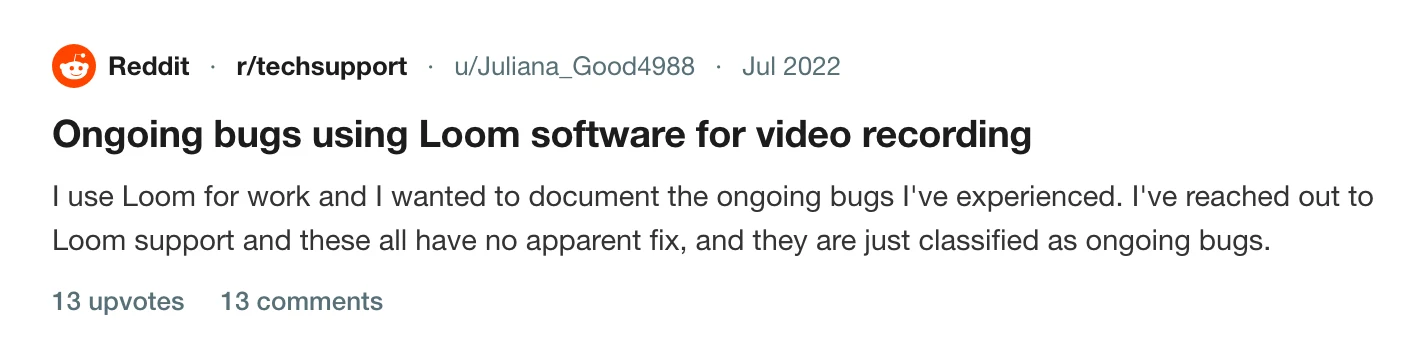
Four of their five items are about picture quality or setup:
- Video quality goes fuzzy after using the pause feature.
- With the window recording mode and screen plus camera, the camera has to be added manually after the recording starts.
- Video quality lags throughout with the Logitech webcam, but not with the MacBook's built-in camera. The issue started on 15 July 2022.
- The video quality does not always match the preset of 1080p.
The post is from 2022 and the app has changed since, so treat it as a report of a pattern and check each one on your own copy. What is useful is how specific it is.
How to check which problem you have
Soft text everywhere, evenly, is a capture-size problem: the recording was made at fewer pixels than your display has. Soft only after a pause, or only with one camera, is a recorder bug or a device one. Why your screen recording looks blurry walks through the four causes in order, and how to make a screen recording look high quality covers the settings.
Try these in order:
- Record 20 seconds with no pause and compare it with a paused one.
- Switch to the built-in camera and record again.
- Check the file's dimensions against your display's pixel size. A 1440 by 900 display should give a 2880 by 1800 recording.
If the quality problem turns out to come with a stalled upload, Loom stuck in processing is the next stop. If the recording never arrived, read Loom crashed and lost your recording.
Record at the screen's own size
Prequel records at the display's full pixel size, up to 4K, with the compositing in Metal and the encoding in hardware. The pointer is recorded as its own layer, not drawn into the frames, so you can resize or smooth it afterwards.
You can see the result in the editor before you export, and export at Full or scaled to 1080p, 720p or 480p. The export page lists the dialog, and the resolution entry explains what each size is for.
Record the same demo in Prequel and compare the two files.
Prequel needs an Apple Silicon Mac on macOS 14 or later. Download Prequel for Mac and try it free for 7 days, with no watermark on anything you export. After that it is $9 a month or $29 once. See what it costs.
Frequently asked questions
- Why does my Loom video look blurry?
- A user on r/techsupport reported Loom video going fuzzy after using the pause feature, and the quality not always matching a preset of 1080p. A blurry result can also come from recording at fewer pixels than your screen has, which the page on blurry screen recordings explains.
- Does pausing a Loom recording lower the quality?
- One user documented exactly that on r/techsupport: video quality going fuzzy after using Loom's pause feature. Loom support classed it as an ongoing bug, according to the same post. It is one report from 2022, so check on your current version.
- Why is my webcam laggy in Loom?
- The same r/techsupport poster saw laggy video only with a Logitech webcam, not the MacBook's built-in camera, starting on a specific date. Try the built-in camera to see whether the lag follows the device.
- What resolution does Prequel record at?
- Up to 4K. Prequel records at the display's full pixel size and exports at that size or scaled to 1080p, 720p or 480p. It needs an Apple Silicon Mac on macOS 14 or later.
Keep reading
- Loom crashed and lost your recording: what you can get backLoom's own help pages say what can be recovered. Desktop recordings sometimes, Chrome extension and mobile recordings never. The page to try first, the folder to check on a Mac, and how to lower the risk.
- Loom stuck in processing: how to recover your videoHow long Loom takes to process a video, when to stop waiting, and Loom's own steps for the desktop app, the Chrome extension and mobile. What the failed upload message means and where the files are.
- Can't log in to Loom since the Atlassian moveLogin loops, a support form that asks for a workspace URL you cannot see, and an account that is now an Atlassian one. The fix a user reported that worked, and how to tell which login you need.