Tella audio out of sync: what its own help centre says
Tella's help centre says it cannot resync audio in the editor and the fix is to re-record. What it documents about microphone delay, a user's report of lag on both apps, and a clap test that tells drift from fixed delay.

If your voice does not match your mouth in a Tella video, the first thing to know is what Tella says about fixing it afterwards.
What Tella says
From Tella's help centre, under "Audio and video are out of sync": "Can I resync audio in the Tella editor? No. Tella does not have a way to nudge or realign audio against video inside the editor. If a recording came out of sync, the reliable fix is to correct it at the source and re-record."
Its explanation is that the microphone and camera deliver to the computer at slightly different rates. The one remedy it documents is a per-microphone delay setting in the Mac app, set before you record. The browser recorder and the Chrome extension do not have it, and its pages point browser users to separate audio routing software. It also has a page for XLR microphones.
What a user reported
A user on r/ProductivityApps wrote in December 2025 that they had used Tella for most of a year and Loom for about two years before, and had a significant problem with lag between sound and image in both the web and desktop apps. They had contacted support several times without a fix.
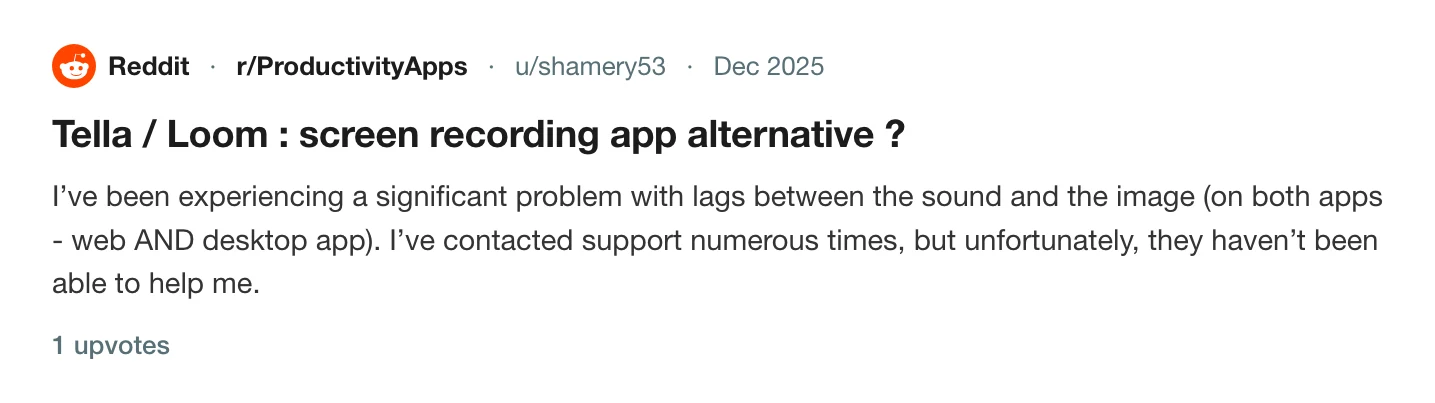
They also wrote that they suspected it was related to their older MacBook Pro, which matters: sync problems can come from the hardware as much as the app. Why your screen recording's audio drifts out of sync covers the causes across tools.
Test it in 30 seconds
- Record 20 seconds on camera with the microphone you will use.
- Clap once at the start and once at the end.
- Open the take and look at both claps in the waveform and on screen.
If the sound is the same distance from the picture at both claps, it is a fixed delay. If the gap is wider at the end, the two devices are running at different speeds, which is drift. A fixed delay can be offset in some tools. Drift needs the cause removed, such as a Bluetooth headset or a USB interface.
A related limit sits behind this one: Tella says nothing you got wrong while recording can be added to the same clip afterwards. What Tella's editor can't do after you record lists it.
If the sound is missing altogether, Tella is not recording computer audio is the page. For iPhone demos, your iPhone demo records as a black rectangle.
Tracks that stay separate
Prequel records the camera, the microphone and the Mac's sound as separate files in the take folder: camera.mp4, mic.m4a and system.m4a. A session.json beside them records when each track started, so the editor places them in time from that. See where files live.
In the editor the Audio panel gives each source an Include switch and a Volume, with noise reduction for the microphone. The timeline shows the waveform, which is where the clap test is easiest to read: see audio and timeline and cuts.
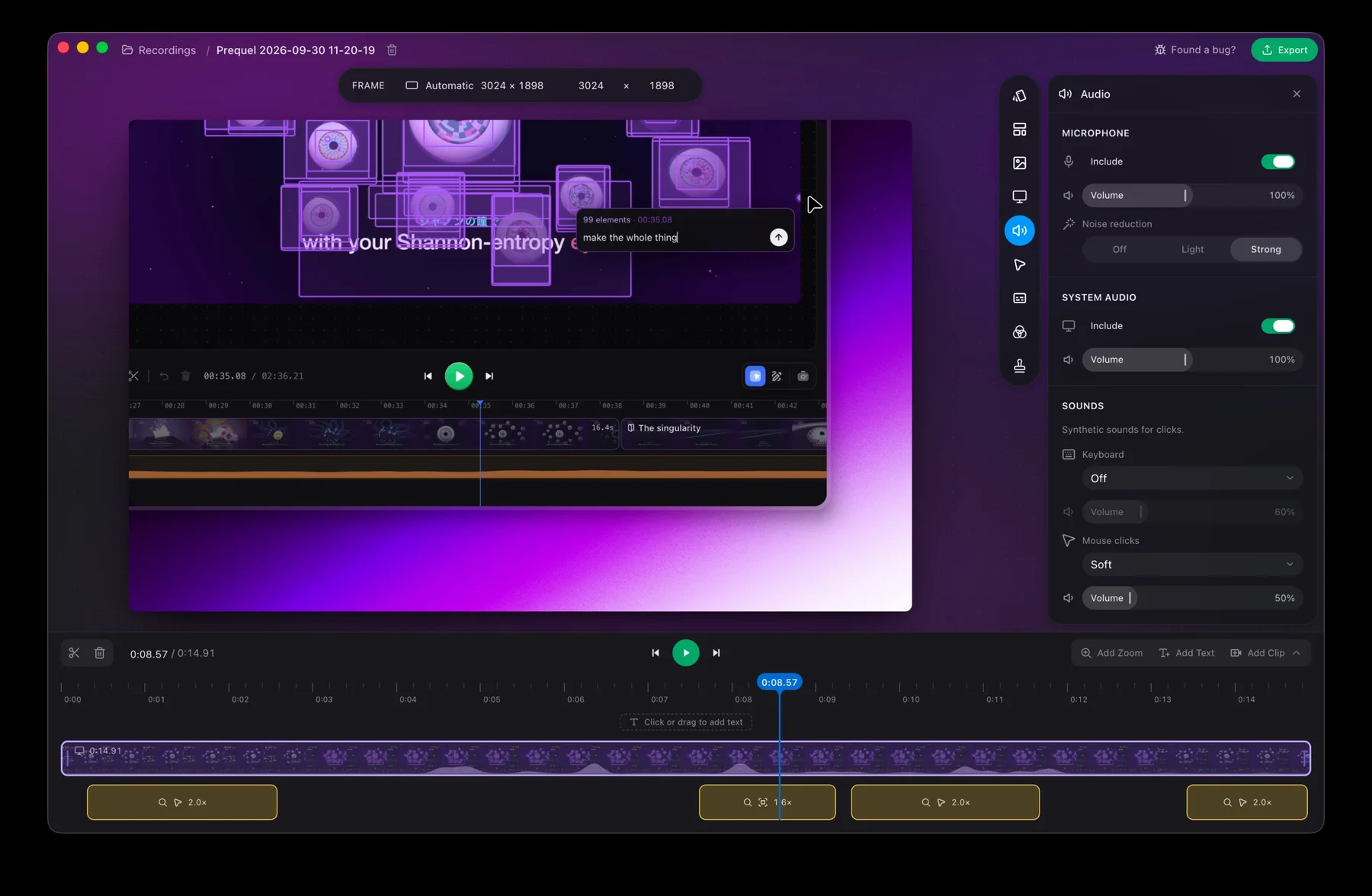
Run the clap test in Prequel before your next long take.
Prequel needs an Apple Silicon Mac on macOS 14 or later. Download Prequel for Mac and try it free for 7 days, with no watermark on anything you export. After that it is $9 a month or $29 once. See what it costs.
Frequently asked questions
- Can I fix audio sync in the Tella editor?
- No. Tella's help centre says it does not have a way to nudge or realign audio against video inside the editor, and that if a recording came out of sync, the reliable fix is to correct it at the source and re-record.
- Why is my voice out of sync with my mouth in Tella?
- A user on r/ProductivityApps reported lag between sound and image in both the web and desktop apps and suspected their own MacBook. Tella's help pages describe the cause as microphone and camera arriving at slightly different rates, and offer a per-microphone delay in the Mac app.
- How do I tell sync drift from a fixed delay?
- Record 20 seconds, clap at the start and again at the end, and look at both claps in the waveform. If the sound is the same distance from the picture both times, it is a fixed delay. If the gap grows, the two devices run at different speeds.
- Does Prequel record the microphone as its own track?
- Yes. The microphone, system audio and camera are separate files in the take folder, and a manifest records when each track started. It needs an Apple Silicon Mac on macOS 14 or later.
Keep reading
- Why your screen recording's audio drifts out of syncA fixed delay and a drift have different causes. What Tella, Cap and Screen Charm document about microphone, camera and cursor sync, a clap test that tells the two apart, and what to change.
- What Tella's editor can't do after you recordTella's help centre says you cannot add your screen or camera to a clip afterwards, record a voice-over onto it, or blur the camera background in the editor. Plus a G2 reviewer's note on the exported background, and what Prequel's editor does with tracks.
- Tella is not recording computer audio: why, and what to useIn Tella's browser recorder and Chrome extension, desktop sound is only captured when you share a browser tab. What Tella's help centre says about each app, and how Prequel records the Mac's own sound without a driver.
- Your iPhone demo records as a black rectangle: how to fix itTella's own tip page says AirPlay mirroring records as a black rectangle. The cable-and-QuickTime route that works, step by step, and how to record that window with Prequel in Window mode.