What Tella's editor can't do after you record
Tella's help centre says you cannot add your screen or camera to a clip afterwards, record a voice-over onto it, or blur the camera background in the editor. Plus a G2 reviewer's note on the exported background, and what Prequel's editor does with tracks.

Tella's editor is built around what you record, and its help centre is direct about the things you cannot change afterwards. These are the ones people run into, in Tella's own words.
You cannot add what you forgot
"I forgot to share my screen (or turn on my camera). Can I add it afterwards? Not to the same clip."
Tella's reason: when you record screen and camera together, "the clip contains two tracks, and layouts arrange those tracks. An uploaded file, or a screen-only or camera-only recording, is a single track. Layouts can only arrange tracks that belong to the same clip, and one clip cannot be layered on top of another."
You can put a second recording in the other slot, but it "plays from the start of the section you put it in and is not synced to the clip automatically."
You cannot record a voice-over onto a clip
"Can I add a voice-over or an audio file to an existing video? You can add an audio file, but you cannot record a voice-over onto a clip inside Tella."
Camera blur is a recording-time setting
"Set your background before you start recording. ... Blur cannot be added in the editor afterwards." Blur and highlight in the editor work on footage in a layout's Screen slot, and media in the Camera slot is unaffected. The blur options also differ by app: the Mac app uses macOS video effects, and the Windows app and Safari have no background effects.
There is one music track
"Background music applies to the whole video, not to a single clip. There's one background track for the video, and it plays across every clip."
The exported background
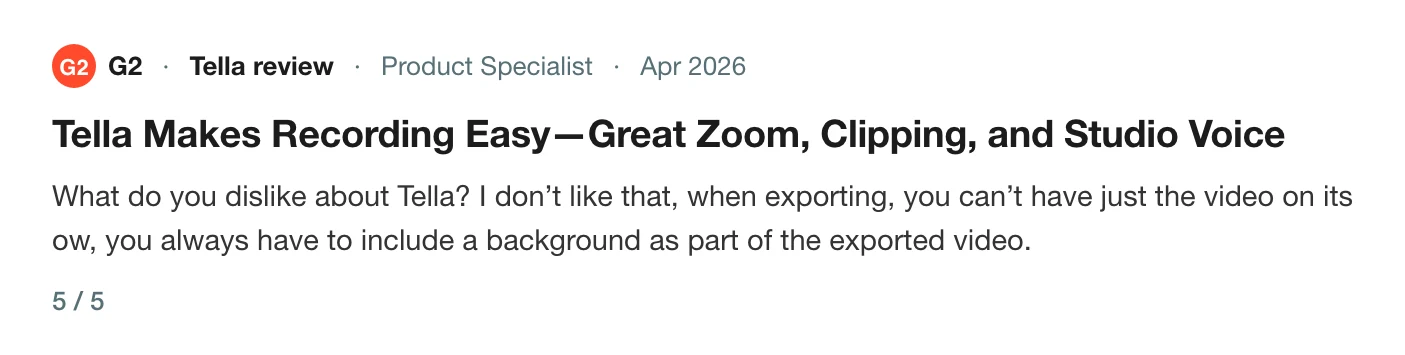
A product specialist reviewing Tella on G2 in April 2026 gave it 5 out of 5, and wrote that they did not like that when exporting you cannot have just the video on its own and always have to include a background. They also wished they could remove elements from the video, or at least hide them, since blurring was the only tool offered.
Tella's help centre has a separate page on exporting raw camera and screen recordings. Those are the source files without your edits, which is not the same as your edit without the background.
Why this matters
None of these is a bug. They are documented boundaries, and the useful thing is to know them before you record, because the decision about the camera, the voice-over and the blur has to be right before you press the button. Related pages cover the audio side: Tella audio out of sync, and for the recording side your iPhone demo records as a black rectangle. If you cannot find the recording to edit it at all, can't find your Tella recording is the page, and Tella export limits lists what each plan exports.
Tracks you place afterwards
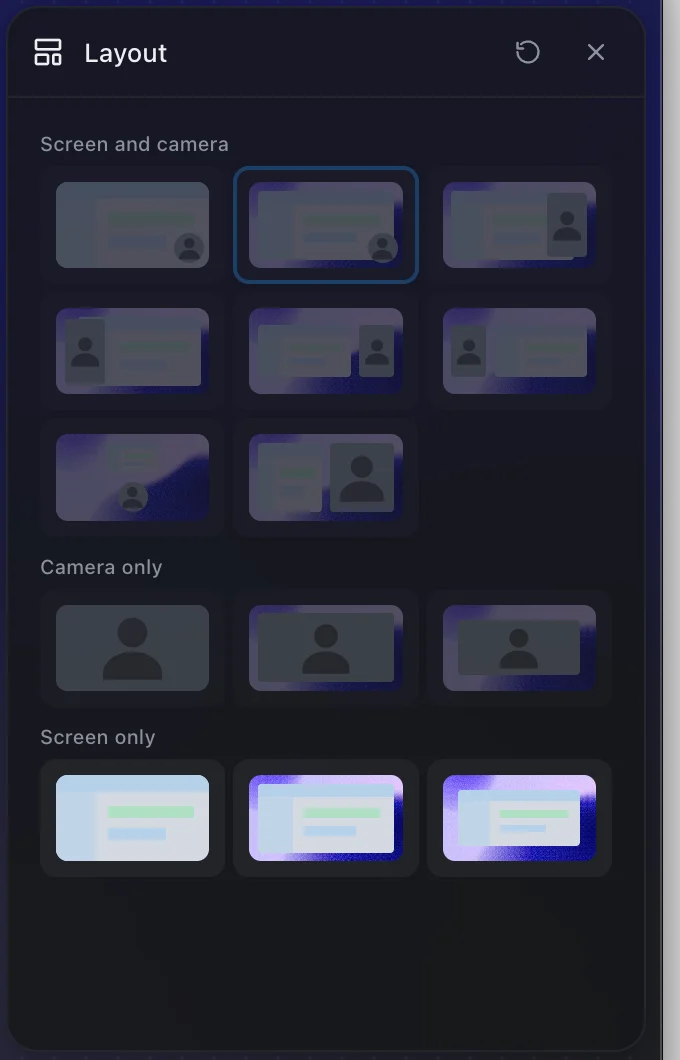
Prequel records the screen, camera, microphone and system audio as separate tracks. The camera is placed in the finished video afterwards, in the editor, so where it sits is decided after you record. The Layout panel offers 14 layouts per clip across screen and camera, camera only and screen only, and each clip can have its own.
The Audio panel gives the microphone and the Mac's sound an Include switch and a Volume each, and noise reduction on the microphone. See layout, camera and audio.
Record once in Prequel and decide the layout afterwards.
Prequel needs an Apple Silicon Mac on macOS 14 or later. Download Prequel for Mac and try it free for 7 days, with no watermark on anything you export. After that it is $9 a month or $29 once. See what it costs.
Frequently asked questions
- Can I add my camera to a Tella video after recording?
- Not to the same clip. Tella's help centre says that if you forgot to share your screen or turn on your camera, you cannot add it afterwards to that clip. You can place a second file in the other layout slot, but it is a separate clip that is not synced to yours.
- Can I record a voice-over in the Tella editor?
- No. Tella says you can add an audio file but cannot record a voice-over onto a clip inside Tella.
- Can I blur my camera background after recording in Tella?
- No. Tella says to set your background before you start recording and that blur cannot be added in the editor afterwards. Blur and highlight work on footage in a layout's Screen slot, and the Camera slot is unaffected.
- How many music tracks can a Tella video have?
- One. Tella says background music applies to the whole video, not to a single clip, and plays across every clip. It also says one clip cannot be layered on top of another, and layouts can only arrange tracks that belong to the same clip.
- What does Prequel's editor do with separate tracks?
- Prequel records the screen, camera, microphone and system audio as separate tracks and places the camera in the finished video afterwards, with a choice of 14 layouts per clip. It needs an Apple Silicon Mac on macOS 14 or later.
Keep reading
- Tella audio out of sync: what its own help centre saysTella's help centre says it cannot resync audio in the editor and the fix is to re-record. What it documents about microphone delay, a user's report of lag on both apps, and a clap test that tells drift from fixed delay.
- Your iPhone demo records as a black rectangle: how to fix itTella's own tip page says AirPlay mirroring records as a black rectangle. The cable-and-QuickTime route that works, step by step, and how to record that window with Prequel in Window mode.
- Can't find your Tella recording: accounts and workspacesTella says a recording that will not open for editing usually means the Mac app and browser are signed in to different accounts, and a missing one usually landed in another workspace. What it says about moving videos and merging accounts.
- Tella export limits: 4K, 60 fps and clip lengthWhat Tella's pricing page and help centre say about export: 4K in Pro, 60 fps in Premium, a 6 hour clip limit, a 5 GB upload cap, and a trial that exports at HD and 30 fps. Checked 5 October 2026.