Tella is not recording computer audio: why, and what to use
In Tella's browser recorder and Chrome extension, desktop sound is only captured when you share a browser tab. What Tella's help centre says about each app, and how Prequel records the Mac's own sound without a driver.

You recorded a demo with a video playing, or a call, and the file has your voice and no computer sound. In Tella, that depends on which Tella you used.
What Tella documents
Tella's help centre has a page called "Record system audio (desktop sound)", and its answer differs by app.
- Mac app: system audio is on by default.
- Windows app: it is off by default, and the control is in settings, not on the control bar.
- Web app and Chrome extension: they can only capture the audio of a single Chrome tab.
The key sentence is: "The 'Also share tab audio' option only appears when sharing a browser tab." If you share a window or a whole display from the browser, there is no desktop sound at all.
What to do in Tella
- Use the Mac app if you want the Mac's sound.
- If you must use the browser, share the browser tab that is making the sound and tick the option to share its audio.
- On Windows, turn system audio on in settings before you record.
- Do a 10-second test and play it back with the sound up.
The Mac's own tools
QuickTime Player records the microphone. It does not record the Mac's own sound without extra software, which is why people install a virtual audio driver. How to record your Mac screen with internal audio goes through the options, and the system audio entry defines the term.
To record a call with both sides, see how to record a Zoom or Google Meet call on a Mac with both sides' audio. For the problems that sit beside this one in Tella, see Tella audio out of sync, your iPhone demo records as a black rectangle and why screen recording audio drifts out of sync.
Prequel records the Mac's sound on its own
Prequel records system audio as a separate track, with no virtual audio driver. Record system audio in Settings is on by default. In the editor, the Audio panel gives the microphone and the system audio each an Include switch and a Volume, so you can drop a video's soundtrack and keep your voice, or the reverse.
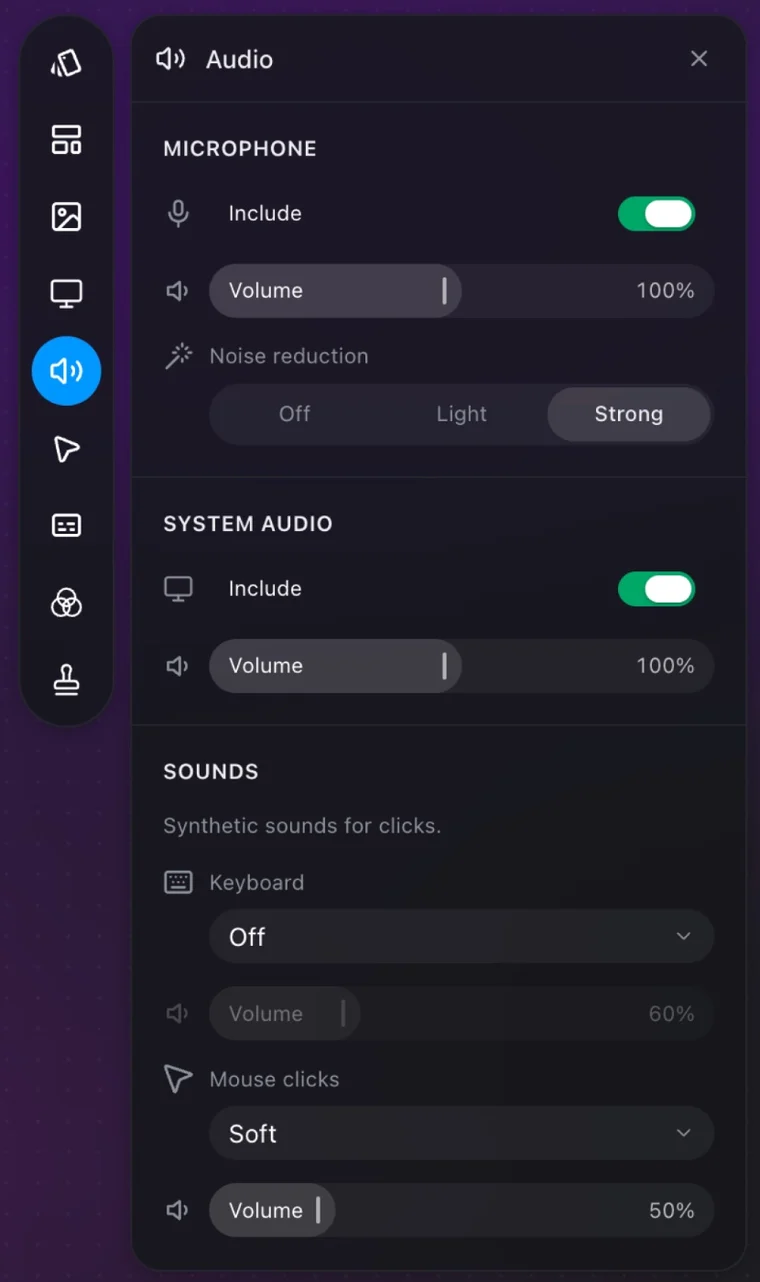
A take made with system audio off has no system track to include later, so check the setting before an important recording. The audio page and the camera and microphone page list every control.
Record a video playing on your Mac and keep its sound.
Prequel needs an Apple Silicon Mac on macOS 14 or later. Download Prequel for Mac and try it free for 7 days, with no watermark on anything you export. After that it is $9 a month or $29 once. See what it costs.
Frequently asked questions
- Why is Tella not recording my computer audio?
- Tella's help centre says the Also share tab audio option only appears when sharing a browser tab. The web app and Chrome extension can only capture the audio of a single Chrome tab, so sharing a window or a whole display from the browser records no desktop sound.
- Does the Tella Mac app record system audio?
- Yes. Tella says system audio is on by default in the Mac app. In the Windows app it is off by default and sits in settings rather than the control bar.
- Can QuickTime record system audio on a Mac?
- QuickTime records the microphone. It does not record the Mac's own sound without extra software, which the guide to recording internal audio covers.
- How does Prequel record system audio?
- Prequel records the Mac's sound as its own track when Record system audio is on in Settings, which it is by default, with no virtual audio driver. You can include or drop it and set its volume separately from your voice. It needs an Apple Silicon Mac on macOS 14 or later.
Keep reading
- Tella audio out of sync: what its own help centre saysTella's help centre says it cannot resync audio in the editor and the fix is to re-record. What it documents about microphone delay, a user's report of lag on both apps, and a clap test that tells drift from fixed delay.
- Your iPhone demo records as a black rectangle: how to fix itTella's own tip page says AirPlay mirroring records as a black rectangle. The cable-and-QuickTime route that works, step by step, and how to record that window with Prequel in Window mode.
- Why your screen recording's audio drifts out of syncA fixed delay and a drift have different causes. What Tella, Cap and Screen Charm document about microphone, camera and cursor sync, a clap test that tells the two apart, and what to change.