Why Tella's editor feels slow
Tella's editor runs in a browser on your graphics hardware and ships a Low-res mode that is on by default. What its help centre says, what users report on Reddit, and how to find out whether it is your Mac or your browser.

A laggy editor is the complaint that fills Tella's help centre, not only its reviews. It comes with a setting built to fix it, and a requirement that explains it.
What Tella says the editor is
Tella's documentation says the editor "draws your video with your computer's graphics processor through WebGPU". That means two things you control and one you do not: your browser, your graphics hardware, and the video it is fed from Tella's servers.
It lists the requirements plainly. Hardware (graphics) acceleration must be on in your browser. The editor "does not run in virtual machines or remote desktop sessions". Safari needs a much newer version for the editor than for recording.
Low-res mode
Tella ships a setting to make the editor faster: "Low-res mode makes the editor faster by playing lower-resolution copies of your video while you edit. It is on by default."
It also says that if you hear pops while editing on Windows but not on the video's share page, low-res mode is the fix.
What users say
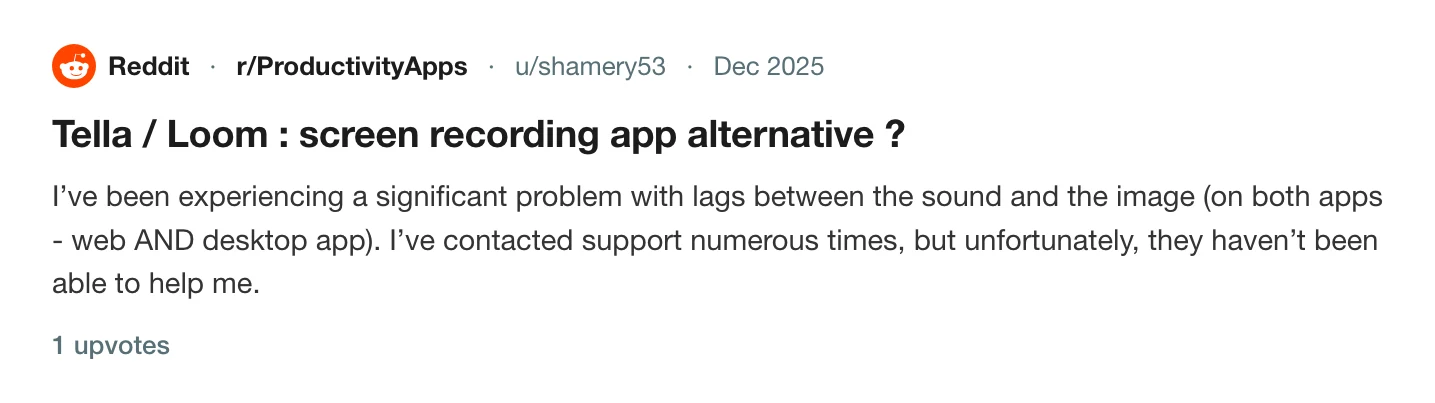
A user on r/ProductivityApps wrote in December 2025 that they had used Tella since January and Loom for about two years before, and that they were experiencing a significant problem with lag between sound and image in both the web and desktop apps. They suspected their MacBook Pro.
In the r/opensource thread where someone asks for a Tella-style tool, the same user replied that they were looking for an alternative to Tella and Loom, and that they found them "tooooo buggy on my 2021 Macbook pro".
Read the thread on r/opensource
That is one person and one machine. It fits Tella's own account of what the editor depends on.
How to find out if it is your Mac
- Use the latest Chrome and confirm hardware acceleration is on in its settings.
- Leave Low-res mode on while you cut, and turn it off only to check a final look.
- Close other tabs that use your graphics hardware.
- Try a different browser to separate a browser problem from a Mac one.
- Avoid remote desktops and virtual machines. Tella says the editor does not run in them.
If it will not load at all, Tella editor won't load lists the four error messages. The upload side of the wait is in why Tella makes you wait before you can edit, and the slowness of the export itself is in Tella export stuck. Recording problems from the same product are in Tella stopped recording.
An editor that is part of the app
Prequel's editor opens inside the Mac app, on the recording you just made. There are no browser settings to check and no copy of the video to stream. Zooms, layout, camera and audio are all panels in the same window, and exporting runs on the Mac's video hardware: see editor overview and export.

Open a recording in Prequel and cut it without a browser.
Prequel needs an Apple Silicon Mac on macOS 14 or later. Download Prequel for Mac and try it free for 7 days, with no watermark on anything you export. After that it is $9 a month or $29 once. See what it costs.
Frequently asked questions
- Why is the Tella editor laggy?
- Tella's help centre says the editor draws your video with your computer's graphics processor through WebGPU, so it depends on your browser and graphics hardware. It ships Low-res mode, which plays lower-resolution copies while you edit, and says it is on by default.
- What is Tella's Low-res mode?
- A setting that plays lower-resolution copies of your video while you edit to make the editor faster. Tella says it is on by default. It also says that if you hear pops while editing on Windows but not on the share page, turning on low-res mode is the fix.
- Does Tella's editor need hardware acceleration?
- Yes. Tella says hardware (graphics) acceleration must be on in your browser, and that the editor does not run in virtual machines or remote desktop sessions.
- Is there a Mac screen recorder whose editor is not in a browser?
- Prequel's editor is part of the Mac app. It opens on your recording when you stop, and exports run on the Mac's video hardware. It needs an Apple Silicon Mac on macOS 14 or later.
Keep reading
- Why Tella makes you wait before you can editTella records on your Mac, uploads, and edits in a browser tab. What its own help centre says about the order, the upload speed it asks for, the two sign-ins, and what editing on your Mac looks like instead.
- Tella editor won't load: the four errors and what they meanTella's editor shows four named errors when it cannot start. What each means, why Safari needs a newer version for editing than for recording, what a virtual machine does, and what to change.
- Tella export stuck: why it happens and what to tryTella has a help page for an export that gets stuck at a percentage or a download window that never finishes. What it says to try, why re-rendering is the first fix, and how exporting on your own Mac avoids the problem.
- Tella stopped recording: browser storage and disk space limitsTella needs 2 GB of free browser storage to start recording and the desktop apps refuse to start below 512 MB of disk. What each limit is, what happens to the part already recorded, and how to recover a take.