Should you upgrade to Screen Studio 4 in 2026?
Screen Studio 4 adds a loupe, a camera cutout and transcript editing, and keeps the $29 monthly price. We put it next to Prequel feature by feature, with five questions to settle before you renew.

TL;DR
| If you are | Do this |
|---|---|
| On a Screen Studio subscription, renewal far off | Update to 4. It is included, and it is a big release. |
| On a subscription, renewal due this month | Run Prequel's seven-day trial on your next video before you pay again. |
| Choosing a Mac screen recorder for the first time | Start with Prequel: $29 once, or $9/mo. |
| On Windows or Linux, or in a mixed team | Neither. Look at Cap. |
Prices read off each vendor's own page on 3 October 2026.
Screen Studio 4 is the biggest update Screen Studio has shipped, and most of it brings the app level with what other recorders already did in September. Whether to pay for it in 2026 depends on what you record, and what you want from the app between now and your next renewal.
What is in the Screen Studio 4 update?
Screen Studio 4, released on 2 October 2026, adds a glass loupe, a camera cut out of its background (in beta), face tracking, colour grading for the camera with twelve looks and LUT support, editing by transcript, split screen layouts, sharper zoomed-in text from a model that runs on the Mac, and exports up to 3x faster.
What it keeps: the $29 monthly or $108 yearly subscription, export at up to 4K and 60 fps, and a 30-minute cap on share links. Projects saved in version 4 do not open in version 3.
Screen Studio 4 vs Prequel, feature by feature
| Feature | Prequel | Screen Studio 4 |
|---|---|---|
| Automatic zoom on clicks and typing | Yes | Yes |
| Loupe: a magnifying glass over the work | Yes, with curvature, fringing and reflection controls | Yes, new in 4 |
| Perspective tilt and focus falloff on zooms | Yes | No |
| Camera cut out of its background | Yes, since 0.0.19 | Yes, in beta, new in 4 |
| Colour looks for the camera | Yes | Yes, new in 4 |
| Edit the video by editing the transcript | Yes, since 0.0.13 | Yes, new in 4 |
| Microphone noise reduction | Yes | Yes |
| Mouse click sounds | Yes, ten to choose from | Yes |
| Typing sounds, made in the app | Yes, five keyboards | No |
| Filters over the picture (CRT, VHS, film and more) | Yes, per clip | No |
| Titles and text over the recording | Yes, eight looks | No |
| Prompter | In the notch, follows your voice | In the speaker notes |
| Captions transcribed on your Mac | Yes | Yes |
| Shareable links | Yes, with chapters and subtitles | Yes, 30-minute cap, branded page |
| Team workspace | Yes | No |
| Maximum export | 4K, 120 fps | 4K, 60 fps |
| Releases since 28 August 2026 | 30 | 4.0, after 3.7.5 on 5 August |
| Price | $29 once, or $9/mo | $29/mo, or $108/yr |
Screen Studio's column is read off its own site and its full changelog on 3 October 2026. "No" means it appears in neither.
The full Prequel vs Screen Studio comparison →
Five questions to ask before you pay for Screen Studio 4
1. Were you waiting for the loupe, the cutout or transcript editing?
If those three were why you were looking around, Screen Studio 4 answers them, and an update you already pay for is the cheapest way to get them. Know that Prequel has had transcript editing since 0.0.13 on 6 September and the camera cutout since 0.0.19 on 13 September, and its loupe shipped in 0.0.35, the same day as Screen Studio's.
If you wanted something past that, typing sounds, filters, titles over the recording or a tilt on the zoom, version 4 does not add it.
Screen recording on a Mac, the complete guide →
2. Do you export at 60 fps, or would 120 look better?
Screen Studio 4 still stops at 4K 60. Prequel exports at up to 4K and 120 fps, in H.264 or HEVC. On a high refresh rate display, a fast scroll or a cursor flick at 120 reads as smooth where 60 shows steps.
3. Does the video need to sound like somebody is using it?
A silent cursor clicking through an app feels like a slideshow. Prequel adds a keystroke for every key you pressed and a click for every click, made in the app, so no microphone picks up your desk. Pick Tactile, Linear, Clicky, Thock or the iPhone keyboard, and one of ten mouse clicks. Each one has a play button so you can hear it first.
Product demo videos that hold attention →
4. How often do you want the app to change?
Screen Studio's 2026 releases before 4.0 were 3.5.2 in January, 3.6 in February, 3.7 in May and 3.7.5 in August, then two quiet months. Prequel shipped 30 releases from 28 August to 2 October: a loupe, more than 15 filters, keyboard and mouse sounds, a teleprompter, text over the recording, microphone noise reduction, camera colour looks, per-clip speed and video import among them.
If you pay monthly, you are paying for what arrives next month as much as for what is there now. Look at the rate, not just the version number.
5. What will a year cost?
| Option | A year of it |
|---|---|
| Screen Studio 4, monthly | $348 |
| Screen Studio 4, yearly | $108, paid up front |
| Prequel, lifetime licence | $29 once, and every year after |
| Prequel, monthly | $9 a month, cancel any month |
The people who feel this most are the ones who record a few videos a quarter. A subscription bills you for the months you do not open the app.
Who should upgrade to Screen Studio 4
You are already subscribed and your renewal is months away. Update: 4.0 is included, and the loupe, the cutout and the transcript editing are all worth having. Keep a copy of any version 3 project you care about first.
Who should try Prequel first
You are choosing a recorder for the first time, your renewal is due, or you want more from the edit than Screen Studio 4 gives you: sounds on the typing, a filter on the intro, a title over each step, a prompter that follows your voice, 120 fps on the way out, and a licence you pay for once.
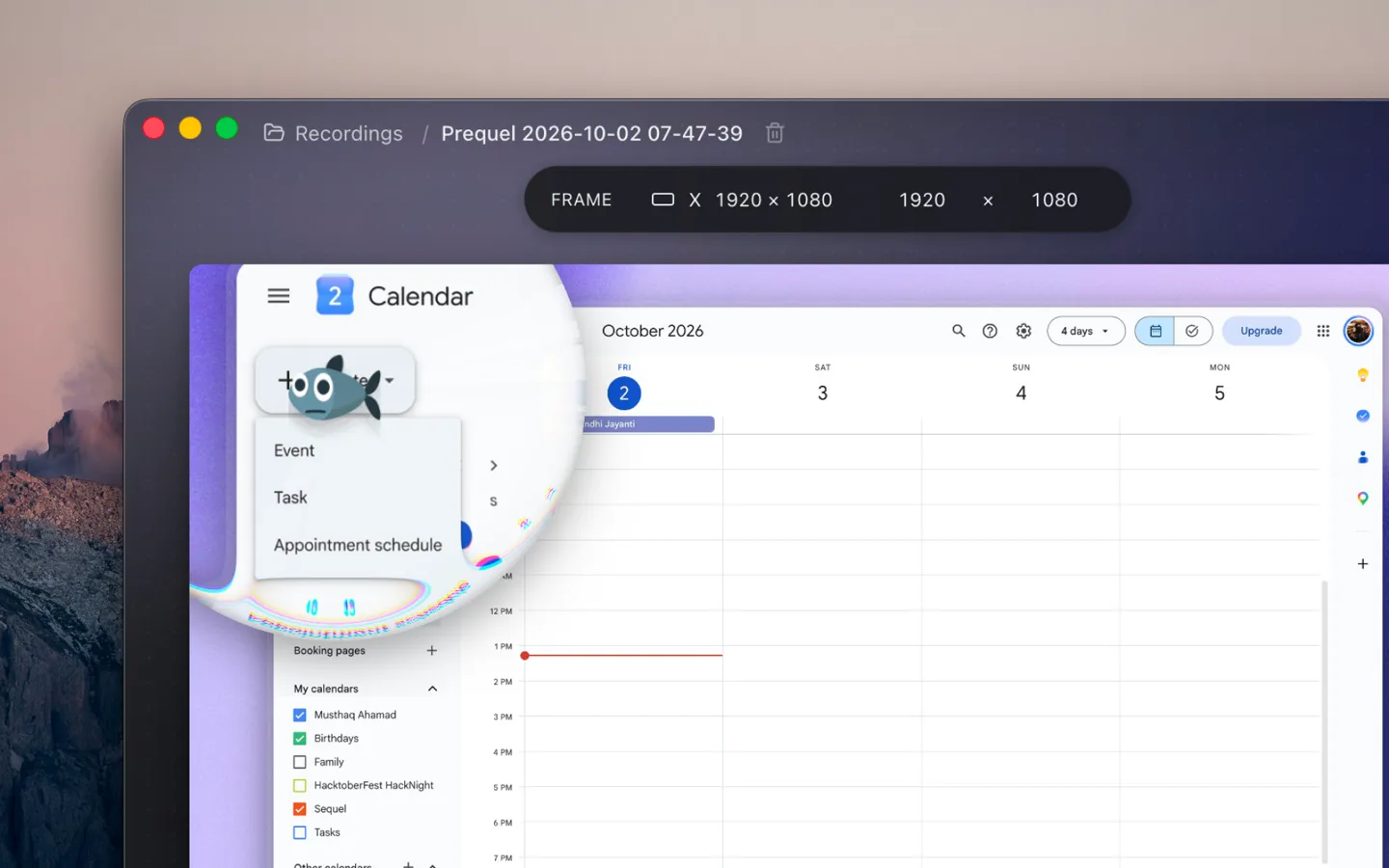
Prequel opens a recording with the first pass done: zooms on every click and burst of typing, the camera framed in a corner, a background with padding and a shadow, the microphone and system audio balanced, and the cursor smoothed and hidden when it idles. From there, every control is yours. Zoom method, glass curvature, colour fringing, filter per clip, keyboard voice, camera shape and look. Export has no watermark on any plan and no cap on how long a take can be.
The code is on GitHub under FSL-1.1-ALv2, which becomes Apache 2.0 two years after each release.
Price. $29 once, or $9 a month. Seven days free with the whole app in it. Requires. An Apple Silicon Mac on macOS 14 or later and the Screen Recording permission.
Related reading: what is new in Screen Studio 4, the best Screen Studio alternatives, Screen Studio vs Cap, screen recorders that zoom on the mouse, and the best screen recorders for Mac.
In the changelog
Frequently asked questions
- Should I upgrade to Screen Studio 4?
- If you already pay for Screen Studio and your renewal is months away, yes: version 4 is included in the subscription and adds a loupe, a camera cutout and editing by transcript. If your renewal is due or you are choosing a recorder for the first time, try Prequel first. It is $29 once or $9 a month, exports at 4K 120, and has a seven-day trial with export included.
- Is Screen Studio worth it in 2026?
- Screen Studio is still a polished Mac recorder, and version 4 is a large release. At $29 a month, or $108 a year up front, it is also among the most expensive tools in its category, and it still exports at 60 fps. Prequel has the same automatic zooms, a loupe, a camera cutout and transcript editing, and adds typing sounds, filters and titles for $29 once or $9 a month.
- Is Screen Studio a one-time purchase?
- Not any more. Screen Studio withdrew its one-time licence in October 2025 and now sells subscriptions only: $29 a month, or $9 a month billed yearly at $108. Screen Studio 4 did not change that. Prequel still sells a lifetime licence at $29 once, alongside a $9 monthly plan, and both are the same app.
- How often does Screen Studio update?
- Through 2026 Screen Studio shipped point releases every few months: 3.5.2 in January, 3.6 in February, 3.7 in May and 3.7.5 in August, followed by version 4 on 2 October. Prequel shipped 30 releases between 28 August and 2 October 2026, each listed in its public changelog.
- Does Screen Studio add keyboard and click sounds?
- Screen Studio has mouse click sound effects, and none for the keyboard. Prequel makes both in the app: pick a keyboard (Tactile, Linear, Clicky, Thock or the iPhone's) and one of ten mouse clicks, and the export carries a sound for every press, timed to the picture, with no microphone involved.
- What does a year of Screen Studio 4 cost compared to Prequel?
- A year of Screen Studio 4 is $348 paid month by month, or $108 paid up front for the yearly plan. Prequel is $29 once for a lifetime licence, or $9 a month on the monthly plan, which can be cancelled any month. Prices checked on each vendor's page on 3 October 2026.