Screen Studio 4: what's new, and what it still costs
Screen Studio 4 is out, with a glass loupe, a camera cutout and editing by transcript. We went through the changelog, put a date next to each headline feature, and listed what it still does not do.

What is Screen Studio 4?
Screen Studio 4 is the fourth major version of Screen Studio, the macOS screen recorder that zooms in on your clicks and your typing and smooths the cursor as it records. It arrived on 2 October 2026, and Screen Studio calls it its biggest update yet: a glass loupe, a camera cut out of its background, editing by transcript, split screen, colour grading for the camera and sharper zooms.
The price did not move. Screen Studio is still $29 a month, or $9 a month billed yearly, which is $108 up front. There is no free tier and no one-time licence; that was withdrawn in October 2025. Export still tops out at 4K and 60 fps.
It is a real release, and it follows a quiet year. Through 2026 the app shipped point releases: 3.5.2 in January with an iPhone 17 Pro Max mockup, 3.6 in February with fixes to microphone selection and export length, 3.7 in May, and its fifth patch in August. Then two months with nothing, and 4.0.
This post covers what is in it, which of it was already shipping elsewhere, and what is still missing.
What is new in Screen Studio 4
Read off Screen Studio's own changelog on 3 October 2026.
- Glass Loupe. A lens magnifies one detail while the rest of the screen stays in view.
- Camera cutout, in beta. Your background is removed on the Mac and you sit in front of the screen.
- Face tracking and Hide during silence. The camera keeps your face centred, and hides itself while you are not talking.
- Colour grading. Twelve looks for the camera, each previewed on your own picture, plus your own LUT files.
- Edit by transcript. Delete a sentence from the transcript to cut it from the video.
- Split screen. You and the screen side by side, or stacked in a vertical video, with animated switches between layouts.
- Sharper zooms. A model trained on generated macOS screenshots sharpens zoomed-in text, on the Mac.
- Faster exports. Up to 3x faster on Apple silicon, and new recordings are up to 2x smaller.
- Smaller things. A redesigned ripple on clicks, keyboard shortcuts drawn as real keys, caption fonts and animations, Unsplash backgrounds, a noise reduction mode for the microphone, and a whole project shared as a link, in beta.
Two things to know before you update. Projects saved in version 4 do not open in version 3. And the changelog warns that zooms in projects made with version 3 "might show a different part of your recording".
The sharper zooms come from a model the founder, Adam Pietrasiak, described in a thread on X on launch day: a bot generated random SwiftUI apps that look like macOS, screenshotted them, shrank the screenshots, and trained the model to put the detail back. Around 5,000 of them.
What did not change
The subscription, and the ceiling. It is $29 a month or $108 a year, with nothing to own. Export is 4K at 60 fps on both plans, a share link stops at 30 minutes and carries Screen Studio's branding, and there is still no team workspace.
Much of Screen Studio 4 was already shipping
Look at the headline list again with dates next to it. Several of the features Screen Studio waited for a major version to ship were already in other recorders by mid-September.
| Screen Studio 4 feature | In Prequel |
|---|---|
| Edit by transcript | Since 0.0.13, 6 September |
| Camera cut out | Since 0.0.19, 13 September |
| Microphone noise reduction | Since 0.0.32, 30 September |
| A loupe over the work | 0.0.35, the same day, 2 October |
| Colour looks for the camera | 0.0.35, the same day, 2 October |
| Sharper zooms | 0.0.35, the same day, 2 October |
Dates from Prequel's public changelog. Cap's 0.6 release on 15 September also added a camera cutout, along with 3D scenes with perspective and focus blur, which Screen Studio 4 still does not have.
Screen Studio got there. It took a year of point releases and a version number to do it, and Prequel shipped 30 releases between 28 August and 2 October. Here is what that looks like.
What Prequel ships today
A loupe you can shape
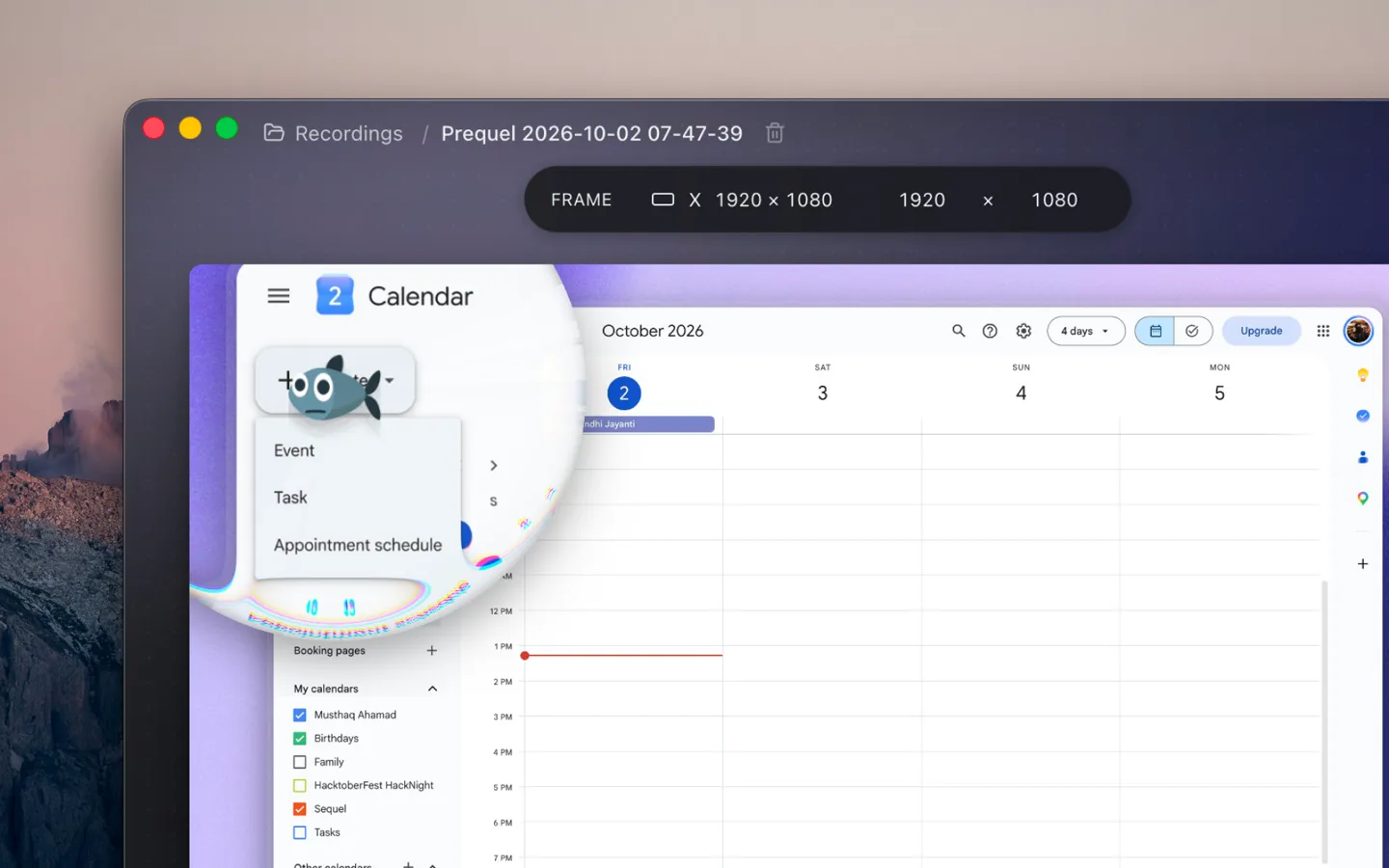
Both apps have a loupe now. In Prequel, set a zoom's Method to Loupe and a magnifying glass comes down over what you are doing, while the rest of the screen stays where it is and stays readable. The glass follows the pointer or holds a region. The Glass tab sets its curvature, colour fringing and reflection, and the picture inside it smears as it travels, so a lens chasing a quick hand reads as motion.
The same release made every zoom sharper: a magnified picture keeps its edges as it grows, and export runs at up to 4K and 120 fps.
Typing you can hear
Under Sounds in the Audio panel, pick a keyboard (Tactile, Linear, Clicky, Thock, or the iPhone's own soft tock) and one of ten mouse clicks, from a barely-there tap to a wooden knock. The export carries a keystroke for every key you pressed and a click for every click, landing on the frame where it happens. Prequel makes the sounds itself, so no microphone is involved, and on the mechanical keyboards no two presses sound quite the same. Every row has a play button, so you can hear it before you pick it.
Screen Studio has had mouse click sounds for a long time. It has nothing for the keyboard, so a demo that is mostly typing stays silent.
Filters over the whole picture
CRT, LCD, VHS, film, halftone, fish eye, glow, Dream, Lost signal, Dither, four retro palettes (Pico-8, Game Boy, C64 and Risograph) and more. Each has its own controls and is set per clip, so the intro can look like a VHS tape and the demo can look like a Mac. Screen Studio 4 has no filters over the picture.
And the rest
- Export at up to 4K and 120 fps. Screen Studio 4 stops at 60.
- A perspective tilt on the push-in, and focus falling away from what the zoom is aimed at.
- Titles and text over the recording, in eight looks, up to five rows deep.
- A teleprompter in the notch that follows your voice as you read and never appears in the recording. Screen Studio's prompter sits in its speaker notes.
- A camera shape that follows you: a free-form bubble that moves as you move.
- Speed per clip, from 0.25x to 4x.
- Import a video you already have, and caption it from its own sound.
- Shared links with chapters and subtitles written from the transcript, and a team workspace.
- A lifetime licence: $29 once.
None of that needed a new major version. It arrived a few days at a time.
Screen Studio 4 and Prequel on price
| Plan | Screen Studio 4 | Prequel |
|---|---|---|
| Monthly | $29 a month | $9 a month |
| Yearly | $108 up front ($9 a month) | $29 once covers it |
| Pay once | Withdrawn in October 2025 | $29 once |
| Maximum export | 4K, 60 fps | 4K, 120 fps |
| Watermark | None on a paid plan | None, on any plan or during the trial |
| Release cadence | 3.6 in February, 3.7 in May, 4.0 in October | 30 releases from 28 August to 2 October |
Screen Studio's prices and export ceiling read off its own site on 3 October 2026.
$29 buys one month of Screen Studio 4, or Prequel for good. If you pay Screen Studio month by month, a year is $348.
So, is Screen Studio 4 worth it
If you are already subscribed, update. It costs you nothing extra, and it is the biggest step Screen Studio has taken in a year. Keep a copy of any version 3 project you care about, since version 4 saves in a format version 3 cannot open.
If your renewal is coming up, or you are choosing a recorder today, record the same take in both and compare the two files. Screen Studio 4 brings the loupe, the cutout and the transcript editing up to where Prequel already was. Prequel adds the typing sounds, the filters, the titles, the tilt and 4K at 120 fps, for $29 once or $9 a month, with several releases a week.
We wrote a longer, feature-by-feature version of that decision:
Should you upgrade to Screen Studio 4 in 2026? →
Prequel's trial is seven days with the whole app in it, export included and no watermark. It needs an Apple Silicon Mac on macOS 14 or later.
Related reading: the best Screen Studio alternatives, Screen Studio vs Cap, Screen Studio vs Loom, screen recorders that zoom on the mouse, and the best screen recorders for Mac.
In the changelog
Frequently asked questions
- What is new in Screen Studio 4?
- Screen Studio 4, released on 2 October 2026, adds a glass loupe, a camera cut out of its background (in beta), face tracking, colour grading for the camera with twelve looks and LUT support, editing by transcript, split screen layouts, sharper zoomed-in text from a model that runs on the Mac, and exports up to 3x faster. Export still tops out at 4K and 60 fps.
- How much does Screen Studio 4 cost?
- Screen Studio 4 costs $29 a month billed monthly, or $9 a month billed yearly, which is $108 paid up front. There is no free tier and no one-time licence, which was withdrawn in October 2025. Prequel, which does the same automatic zooms and exports at up to 4K 120, is $29 once or $9 a month.
- Is Screen Studio 4 a free upgrade?
- For anyone on a current Screen Studio subscription, yes. Both the monthly and the yearly plan include all Screen Studio features and new features as they ship, so version 4 arrives as an ordinary update. Projects saved in version 4 do not open in version 3, so keep a copy of any version 3 project you care about.
- Does Screen Studio 4 export at 120 fps?
- No. Screen Studio 4 exports at up to 4K and 60 frames a second on both plans, the same ceiling as version 3. Prequel exports at up to 4K and 120 fps on every plan, in H.264 or HEVC, with no watermark.
- Does Screen Studio 4 have typing sounds or filters?
- No. Screen Studio has mouse click sounds, but neither its site nor its changelog lists sounds for the keyboard, or filters over the whole picture. Prequel makes typing sounds in the app with five keyboards to choose from, ten mouse clicks, and more than 15 filters such as CRT, VHS and film, set per clip.
- What is the best alternative to Screen Studio 4?
- On a Mac, Prequel. It has had editing by transcript since 6 September 2026 and a camera cutout since 13 September, and adds a loupe, typing sounds, filters, titles over the recording, a prompter that follows your voice and export at up to 4K 120. It costs $29 once or $9 a month. It needs an Apple Silicon Mac on macOS 14 or later.