Editing
Padding, corners and shadow
How the recording is presented inside the frame.
The Recording panel
The panel is named for what it dresses: the recorded screen, as opposed to the frame around it.
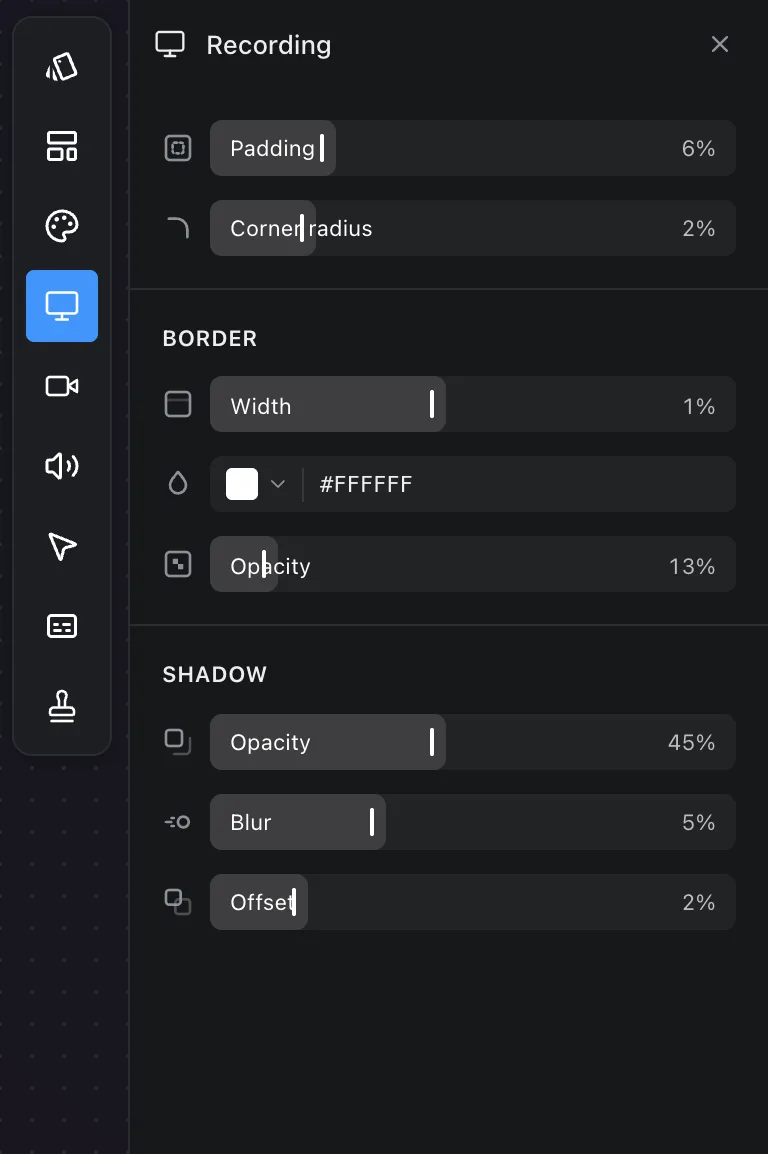
- Padding is the gap between the recording and the frame's edge, as a share of the frame.
- Corner radius rounds the recording's corners.
- Border: Width, Colour and Opacity for an edge around the recording. A thin, low-opacity border reads as a hairline and is the usual choice; a solid white edge at full opacity reads as a frame around a frame.
- Shadow: Opacity, Blur and Offset for a drop shadow onto the background.
Full-frame layouts
A layout with the screen at full frame has no padding to show a shadow or a corner in, so these controls do nothing until you choose a padded layout. See Layout.
Frequently asked questions
- Why do padding and shadow do nothing?
- The layout has the screen at full frame, so there is no gap to show them in. Choose a padded layout and they take effect.
- What border looks right?
- A thin border at low opacity reads as a hairline edge. A wide, fully opaque one reads as a frame around a frame, so the defaults stay subtle.
- Are these sizes in pixels?
- No. Padding, corner radius and border width are shares of the frame's shorter edge, so the same value looks the same at 720p and 4K.